Why Your Page Shows & Instead of & (The Double-Encoding Bug, Explained)
Learn why your HTML shows &amp; instead of &, how to fix double-encoding bugs, encode < and > safely, and understand HTML vs XML entity rules.
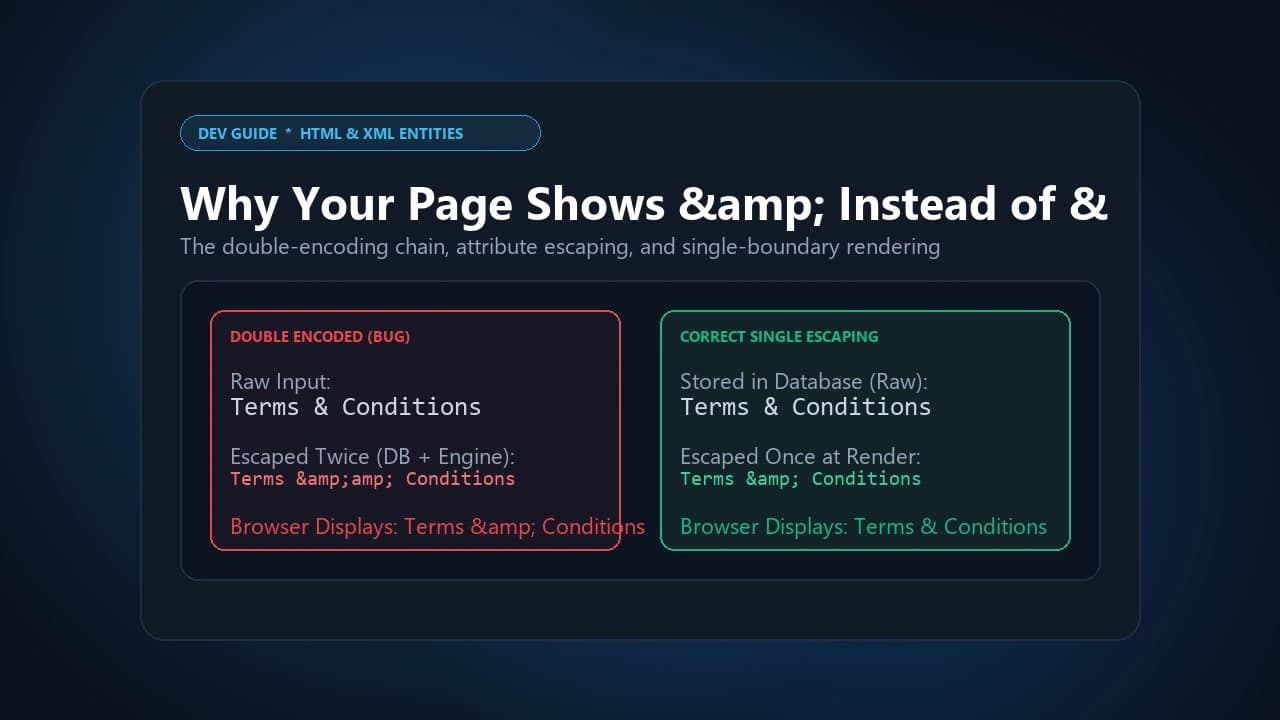
Seeing &amp; or literal amp; text on your live page is almost always caused by double-encoding — a string getting HTML-escaped twice across two separate layers of your stack. This typically happens when a database sanitization step converts & into & on save, and then a templating engine (Blade, Jinja, Twig) or frontend framework (React, Vue) automatically escapes output by default, converting the leading & of that already-encoded entity into & a second time. The result, &amp;, gets partially decoded by the browser's parser — it resolves the first entity back into a literal &, then displays the remaining amp; as visible text. The fix is establishing a single point of escaping, at final output only, rather than encoding data before it's stored.
The Core Fix: Escape Once, at the Right Boundary
Nearly every entity-related bug on this page traces back to the same root cause: escaping happening at the wrong layer, or happening more than once. The correct pattern is: store raw, unescaped text in your database, and apply HTML escaping exactly once, at the final point where that text gets rendered into a document. If you escape at ingestion and your template engine escapes again at output, you get double-encoding. If you escape at ingestion but assign the value directly to .textContent in JavaScript, you get the opposite problem below.
Why Entities Show as Literal Text Instead of Rendering
If you're seeing & or < appear as literal characters on the page instead of rendering as & or <, the cause is usually one of two things:
1. Wrong DOM insertion method. Assigning an encoded string to .textContent or .innerText tells the browser to treat it as plain text — entities never get decoded because the string never passes through an HTML parsing context. Using .innerHTML (with properly sanitized input) or a templating method that parses HTML will decode the entities correctly.
2. Wrong MIME type. If a server response is served with a text/plain content type instead of text/html, the browser doesn't invoke its HTML parser at all — everything renders as literal text, entities included.
Common Entity Symptoms and Root Causes:
- & visible on page: Double encoding across sanitization + templating layers. Fix: Escape once, only at final output.
- Entity strings shown literally: Assigned to .textContent/.innerText, or wrong MIME type. Fix: Use proper HTML parsing context; verify Content-Type: text/html.
- Broken layout or truncated text: Unescaped < interpreted as an unclosed tag. Fix: Always encode < and > before injecting dynamic content.
- & appearing in URLs: HTML entity encoding mixed with URL percent-encoding. Fix: Keep URLs percent-encoded (%26) using our URL Encoder/Decoder; reserve & for HTML documents only.
How to Encode < and > (And Why It Matters)
If you're writing technical documentation and need to show a comparison operator like if (x < 10) inside a webpage, an unescaped < will be interpreted by the browser as the start of a new tag — corrupting everything after it. The fix is straightforward substitution:
Essential Character Substitutions:
- & (Ampersand): Named entity & — Decimal & — Hex &
- < (Less than): Named entity < — Decimal < — Hex <
- > (Greater than): Named entity > — Decimal > — Hex >
- " (Double quote): Named entity " — Decimal " — Hex "
- ' (Single quote / apostrophe): Named entity ' (preferred over ') — Decimal ' — Hex '
- Non-breaking space: Named entity — Decimal   — Hex  
- © (Copyright): Named entity © — Decimal © — Hex ©
- ® (Registered trademark): Named entity ® — Decimal ® — Hex ®
- ™ (Trademark): Named entity ™ — Decimal ™ — Hex ™
HTML Entities vs. XML Entities — They're Not the Same Set
This trips up a lot of people working with RSS feeds, SVG, or SOAP services. HTML5 supports over 2,000 named character entities (©, , —, and more). XML defines exactly five: <, >, &, ', and ". Feed an XML parser a valid HTML entity like without a matching DTD declaration, and it throws a fatal "undefined entity" error and stops parsing entirely. In XML contexts, always use numeric entities ( ) instead of HTML named shortcuts.
Escaping Quotes Inside HTML Attributes
If you're injecting a dynamic string into an attribute like value, placeholder, or alt, an unescaped quote matching the attribute's delimiter closes it early and corrupts the markup. A string like Ben & Jerry's "Holdings" Inc needs to become Ben & Jerry's "Holdings" Inc before it's safe to embed. Note the preference for ' over ' for the apostrophe — ' is valid HTML5 and XML, but historically failed to render correctly in legacy Internet Explorer under HTML 4.01, so the numeric form remains the safer default for broad compatibility.
JSON Escaping vs. HTML Escaping — Don't Mix Them
These are genuinely different systems, and conflating them causes real bugs. JSON uses backslash escape sequences (", ,
), while HTML uses entity sequences ("). A common mistake: HTML-encoding a string before storing it, then serializing that already-encoded string into JSON and sending it to a mobile app. The mobile client — which doesn't decode HTML entities by default — renders the literal entity text instead of the intended character. When formatting API payloads, validate and serialize raw data using our JSON Formatter & Validator rather than manually escaping strings beforehand. Rule of thumb: keep data raw until the exact final rendering context, and apply the escaping scheme that context actually requires — never both.
HTML Entity Encoding as XSS Defense — Where It Works and Where It Doesn't
Encoding < and > into < and > is a genuinely effective defense against Cross-Site Scripting (XSS) when the untrusted input lands inside HTML body text — a malicious <script> payload gets rendered as harmless visible text instead of executing.
Key boundaries where entity encoding alone fails:
- Inside an unquoted attribute: An attacker can inject whitespace followed by an event handler, bypassing angle-bracket encoding entirely.
- Inside an inline <script> block: Browser execution happens after HTML parsing completes — entity encoding has no effect there. Use Unicode escapes or avoid inline interpolation.
- Inside URI attributes: In href or src, browsers decode entities before resolving the protocol — meaning an entity-encoded javascript: payload can still execute on click. The real fix here is protocol whitelisting (enforce http:/https: only), not entity encoding.
For binary payloads or data transfer where character encoding causes friction, convert your raw assets using our Base64 Encoder/Decoder. Input sanitization (stripping dangerous tags) and contextual output encoding (escaping characters at render time) are two different defenses — you generally need both, applied at the right layer, not one instead of the other.
Decoding HTML Entities in Server-Side JavaScript (No DOM Available)
The classic browser trick — assigning a string to a hidden <textarea> or <div> and reading back .textContent — doesn't work in Node.js, Cloudflare Workers, or Edge Functions, because there's no document or window object. In these environments, you need a lightweight lookup-table-based decoder that doesn't depend on browser APIs — worth using a dedicated library or utility rather than trying to fake DOM behavior server-side.
Frequently Asked Questions
Why does my page show &amp; instead of just &?
This is double-encoding — the string was HTML-escaped twice, usually once during data sanitization and again by a templating engine's automatic output escaping. Fix it by escaping only once, at the final rendering point.
Is HTML entity encoding enough to prevent XSS?
Not on its own. It works well for content placed directly in HTML body text, but fails to protect unquoted attributes, inline <script> blocks, and URI attributes like href — those need additional, context-specific defenses.
Can I use HTML named entities like in an XML document?
No — XML only defines five entities (<, >, &, ', "). Any other named HTML entity will cause a fatal parsing error unless you declare a matching DTD. Use numeric entities instead.
Should I use ' or ' for an apostrophe?
' is the safer choice for broad compatibility — ' is valid in HTML5 but historically failed in older Internet Explorer versions running HTML 4.01.
Safely encode and decode HTML entities, symbols, and special characters instantly with our Toolkito HTML Entity Encoder/Decoder.
Toolkito Engineering Team — Reviewed by TeXCodes Systems Architecture
Contributing writer at Toolkito
More from the Blog & Tools

Tutorials
How to Remove Background from Images for Free Online
HTML Entity Encoder/Decoder
Safely encode special characters, decode HTML entities & prevent XSS bugs in real-time.

Web Performance