Why 100 + 10% − 10% Doesn't Equal 100 (And Other Percentage Math That Trips Everyone Up)
Learn why 100 plus 10% minus 10% equals 99, how to calculate original price before discount, markup vs margin formulas, and reverse percentage math.
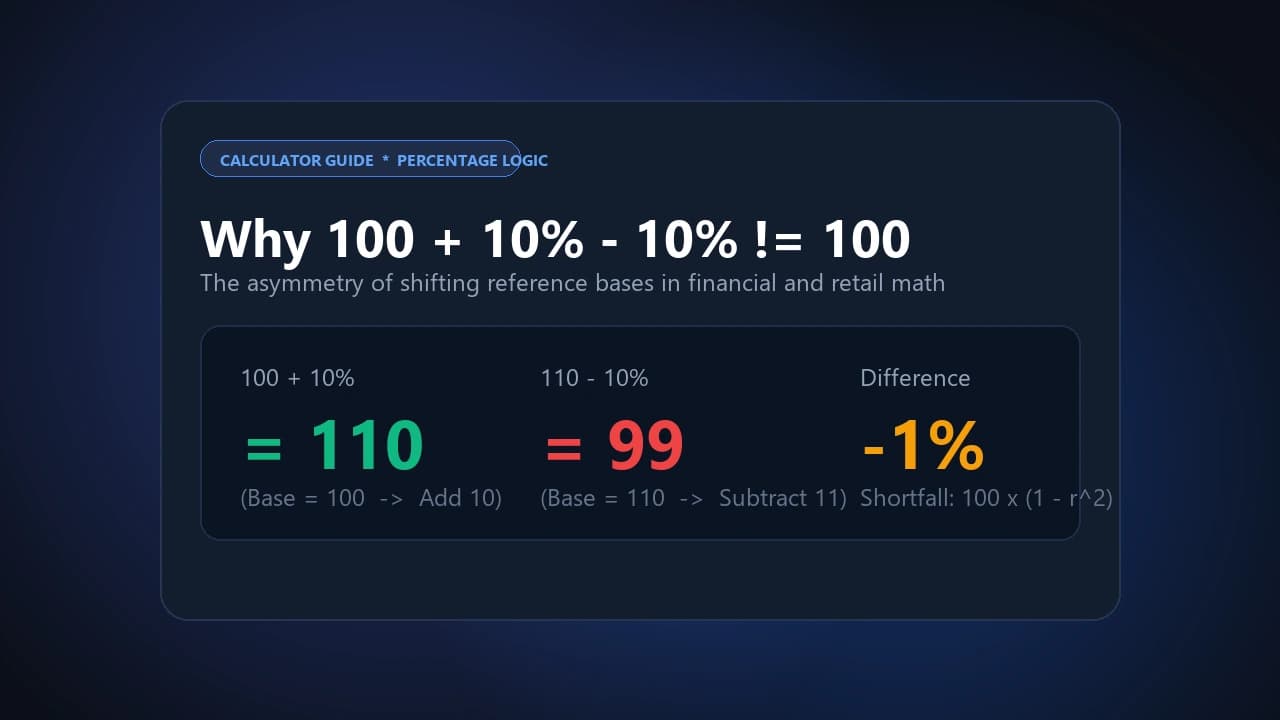
Increasing 100 by 10% gives you 110. Decreasing that 110 by 10% gives you 99, not 100 — and this isn't a calculator error. It happens because percentage changes are always calculated against the current base value, not the original one. The 10% increase is measured against 100 (adding 10). The 10% decrease is then measured against the new, larger base of 110 (subtracting 11, not 10). This asymmetry exists in every sequential percentage change, and the size of the shortfall grows with the size of the rate: mathematically, applying +r% then −r% always leaves you at 100×(1−r²), where r is the rate as a decimal. A 10% up-then-down cycle always lands at 99, not 100 — and a 50% up-then-down cycle lands at 75, not 100.
The Core Rule Behind Every Percentage Mistake on This List
Nearly every percentage error people run into traces back to one thing: which number is the base changes between steps, and most mental math assumes it doesn't. Once you internalize that percentages are always relative to a specific reference point — and that reference point can shift — the rest of this guide is just applying that one idea to different real-world situations.
How to Calculate the Original Price Before a Discount
The most common mistake here is trying to reverse a discount by adding the percentage back. If an item is discounted 20% down to $80, adding 20% back to $80 gives you $96 — not the original $100.
The correct approach: divide by what's left after the discount, not what was removed.
Original Price = Sale Price ÷ (1 − discount rate)
Original Price = $80 ÷ (1 − 0.20) = $80 ÷ 0.80 = $100
The same logic applies in reverse for tax. To find a pre-tax (net) price from a tax-inclusive gross total:
Net Price = Gross Price ÷ (1 + tax rate)
For a £120 gross price with 20% VAT: £120 ÷ 1.20 = £100 — not £120 − (£120 × 0.20) = £96, which is the mistake most people make.
Common Reversal Scenarios:
- Retail discount reversal (Sale $80, 20% off): Wrong: $80 + $16 = $96. Correct: $80 ÷ (1 − 0.20) = $100.00.
- Promo price reversal (Final $120, 20% promo): Wrong: $120 × 1.20 = $144. Correct: $120 ÷ (1 − 0.20) = $150.00.
- VAT extraction (Gross £120, 20% VAT): Wrong: £120 − £24 = £96. Correct: £120 ÷ (1 + 0.20) = £100.00.
- Post-inflation reversal (Inflated $1,500, 25% rise): Wrong: $1,500 − $375 = $1,125. Correct: $1,500 ÷ (1 + 0.25) = $1,200.00.
Markup vs. Margin — Why These Get Confused (Expensively)
Markup and margin both describe the relationship between cost and selling price, but they use different denominators — and mixing them up creates real pricing errors.
- Markup = Gross Profit ÷ Cost (COGS)
- Gross Margin = Gross Profit ÷ Revenue (selling price)
If your cost is $100 and you want a 50% markup, your price is $150 (profit of $50 on a $100 cost = 50% markup). But if you actually wanted a 50% margin, that same $100 cost needs a $200 price — because $100 profit ÷ $200 revenue = 50% margin. Assuming these are interchangeable and applying "50% markup" when you meant "50% margin" leaves you $50 short per unit on your target profit.
Converting between them:
Markup = Margin ÷ (1 − Margin)
Margin = Markup ÷ (1 + Markup)
In Excel or Google Sheets, calculating a price from a target margin uses =Cost / (1 - Margin); calculating from markup uses =Cost * (1 + Markup) — these are not the same formula, and swapping them is the single most common spreadsheet pricing error. When forecasting long-term debt or financing schedules, pair these margins with our Loan Calculator.
Percentage of a Percentage
When you need to find a rate applied within another rate — a distributor's commission on a category's share of total revenue, for example — the two rates multiply as decimals, not add:
Combined % = (Rate 1 ÷ 100) × (Rate 2 ÷ 100) × 100
Example: an 8% commission on a product category responsible for 15% of total company revenue works out to 0.08 × 0.15 = 0.012, or 1.2% of total company revenue — not 8% and not 23%.
Do You Calculate Tip Before or After Tax?
Tipping custom traditionally calculates the tip on the pre-tax subtotal, but many point-of-sale terminals now default to suggesting tips on the post-tax total — which quietly compounds into a "tax on the tip." On a $100 bill with 10% tax ($10), a 20% tip pre-tax is exactly $20. The same 20% calculated post-tax on the $110 total comes to $22 — a small but real difference that adds up at scale. For quick table math on group dining, check our Tip Calculator.
Percentage Increase vs. Percentage Point Increase
These sound interchangeable but describe different things entirely. If an interest rate moves from 4% to 5%, that's a 1 percentage point increase (simple subtraction: 5 − 4). But expressed as a relative percentage increase, it's actually 25% (the change of 1, divided by the starting value of 4). Financial and economic reporting frequently conflates the two, and the difference matters — "rates rose 25%" and "rates rose 1 percentage point" describe the identical event but sound very different. You can track milestone changes or demographic age thresholds using our Age Calculator.
Why Percentage Change With Negative Numbers Gives Backwards Results
If a business's operating profit moves from −$50,000 to +$50,000, the standard percentage change formula gives a misleading answer:
(50,000 − (−50,000)) ÷ (−50,000) × 100 = −200%
That reads as a decline, despite performance actually improving by $100,000. The fix is applying the absolute value to the base:
Corrected % Change = (V₂ − V₁) ÷ |V₁| × 100 = 100,000 ÷ 50,000 × 100 = +200%
Always apply the absolute value to your starting figure when it's negative — otherwise the sign of the result can invert the true direction of the change.
Frequently Asked Questions
Why does adding and then subtracting the same percentage not return the original number?
Because each percentage change is calculated against a different base value — the increase is measured against the smaller starting number, while the decrease is then measured against the larger, already-increased number.
How do I find the original price before a discount was applied?
Divide the sale price by (1 − discount rate), rather than adding the discount percentage back to the sale price. Adding it back undercounts the original value.
Is a 50% markup the same as a 50% margin?
No. A 50% markup on a $100 cost yields a $150 price. A 50% margin on the same $100 cost requires a $200 price. They use different denominators (cost vs. revenue) and are not interchangeable.
What's the difference between a percentage increase and a percentage point increase?
A percentage point increase is a simple subtraction of two rates (e.g., 4% to 5% is +1 point). A percentage increase expresses that same change relative to the starting value (that same move is a +25% relative increase).
Calculate any percentage increase, discount, margin, or proportion instantly with our Toolkito Percentage Calculator.
Toolkito Engineering Team — Reviewed by TeXCodes Systems Architecture
Contributing writer at Toolkito
More from the Blog & Tools

Tutorials
How to Remove Background from Images for Free Online
Percentage Calculator
Calculate percentage increase, decrease, discounts, margins & markup instantly.

Web Performance